


vue-router history 异闻录
内容提要
vue-router 的 history 模式在非根目录部署时,需将路由设为 history 模式并配置 base(如 /dist);webpack 的 publicPath 设为 /dist/;打包后部署到 nginx,用 location /dist/ 配合 try_files $uri $uri/ /dist/index.html 解决刷新 404,核心是前后端协作处理路径匹配。
延伸解读
history 模式刷新 404 的根源
文章指出,hash 模式下服务器只处理 # 前的路径,而 history 模式使用 history.pushState 修改地址,刷新时浏览器会向服务器请求完整路径。如果服务器没有配置对应路径的返回规则,就会返回 404。因此,非根目录部署时,必须让服务器将前端路由路径回退到 index.html,由前端路由接管。
base 与 publicPath 的配合
在非根目录部署时,vue-router 的 base 用于告诉路由当前应用的基础路径,避免匹配时包含多余前缀;webpack 的 publicPath 则确保打包后的静态资源引用路径正确。两者需保持一致,例如 base 设为 /dist,publicPath 设为 /dist/,否则可能出现页面空白或资源加载失败。
nginx 配置中的路径匹配细节
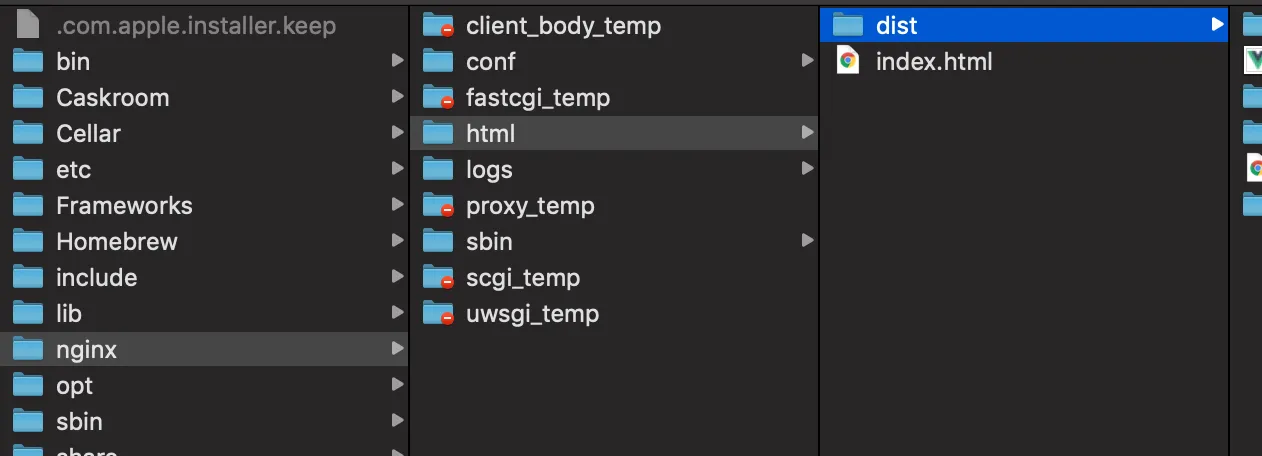
文章解释了 location /dist/ 块中 root 与 try_files 的路径处理差异:location 匹配到的 /dist/ 会附加到 root 后面,而 try_files 中的 /dist/index.html 是相对于 root 的路径。这种不一致容易让人困惑,但正确配置后,刷新 /dist/ 下的路由会回退到 /dist/index.html,从而进入前端路由。
Q&A
vue-router 的 history 模式在非根目录部署时,为什么需要配置 base?
因为 history 模式打开页面时,浏览器地址栏中会包含 base 路径(例如 /dist/),vue-router 需要根据 base 配置来去除这部分路径,才能正确匹配前端路由。如果不配置 base,页面会一片空白,因为路由匹配不到。
在非根目录部署 vue-router history 模式时,webpack 的 publicPath 应该怎么设置?
在 webpack 配置中,将 publicPath 设置为生产环境下的子目录路径,例如:publicPath: process.env.NODE_ENV === 'production' ? '/dist/' : '/'。这样打包后的资源路径才会正确指向子目录。
nginx 中如何配置 location 和 try_files 来解决 history 模式刷新 404 的问题?
在 nginx 配置中添加:location /dist/ { root html; index index.html; try_files $uri $uri/ /dist/index.html; }。这样当访问 /dist/ 下的路径时,如果文件不存在,会回退到 /dist/index.html,由前端路由处理,从而避免刷新 404。
vue-router 的 hash 模式和 history 模式在刷新时有什么不同?
hash 模式下,URL 中 # 后面的部分由前端处理,服务器只负责 # 前面的路径,所以刷新时不会向服务器请求 # 后的路径,不会出现 404。history 模式下,URL 没有 #,刷新时浏览器会向服务器请求完整路径,如果服务器没有配置对应的路由回退,就会返回 404。
为什么 history 模式需要后端配合?
因为 history 模式使用 history.pushState API 修改 URL,刷新时浏览器会向服务器请求当前 URL 路径。如果服务器没有配置将未匹配的路径回退到 index.html,就会返回 404。因此需要后端(如 nginx)配置 try_files 等规则,将请求交给前端路由处理。
在 nginx 配置中,location /dist/ 和 try_files 是如何配合工作的?
location /dist/ 匹配到请求后,会使用 root html 和 index index.html,因此服务器会尝试返回 html/dist/index.html。try_files $uri $uri/ /dist/index.html 会先检查请求的文件或目录是否存在,如果不存在则回退到 /dist/index.html,由前端路由处理。注意 location 匹配的路径会加到 index 前面,而 try_files 中的路径是相对于 root 的。
